

NeuraView is integrated with the NeuraScanner software.
Acquiring Images from NeuraScanner:
This option is available if you have also purchased a NeuraScanner. In addition to opening existing files, NeuraView has an easy and seamless interface to NeuraScanner.
To acquire an image from the NeuraScanner, first ensure the NeuraScanner is turned on and plugged into the computer. Also be sure the paper log is loaded.
To acquire the image from NeuraScanner:
- Go to the Raster ribbon and click on Scan Image
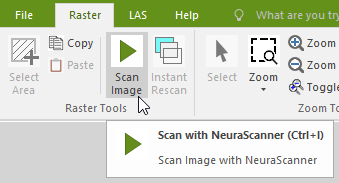
- This will automatically launch the NScan application (NScan.exe).
- The default image name starts with “DefaultName_” and ends with a number (e.g., “DefaultName_3”). By default, the image will be in the Project directory.
- We recommend changing the name to something more meaningful — such as the API number or Well Name.
- Now you can start scanning.
- When scanning is complete, the scanned image will automatically appear in a new window in NeuraView.