

If the printer seems to start a print, but only feeds media and never starts to print, it could be missing the marks on the media. Here are several possibilities and resolutions.
Paper loaded backwards or updside down
Paper must be loaded with the marks facing down and on the right hand side. Verifiy the paper has been loaded correctly.
Printhead is not properly connected
If the printer seems to print the full well log, but there is no print on the media, it may be that the printhead is disconnected or improperly connected. Hold the [un]printed page up to a light. If you can see a faint representation of what you intended to print, this means the printer received the data, but the printhead was not engaged. The printhead can likely be reseated in office. Contact Neuralog support.
Paper marks are faint
If the printer gives a mark detection error and the paper is loaded correctly, check the marks on the paper. If they appear fainter than solid black (or even if they appear "normal") you may need to adjust the sensitivity of the printer's mark sensor to work with that paper.
Adjusting the Mark Sensor Sensitivity
The mark sensor is adjusted with a configuration file using the MCT program.
The configuration file is downloaded from the Neuralog Support Page: Mark Sensor Adjustment
Issue: Printer does not print because it is missing marks.
Cause: Paper marks are fainter than normal.
Symptoms: Printer moves media but does not print. Red LED flashes 4 blinks.
Best Diagnosis: Power printer off. Hold down jog button and power on.
- Normal behavior is printer feeds blanks, reverses slightly, then prints status report.
- Abnormal behavior is printer feeds 2-3 blank forms and does not print. Begins flashing 4 blinks.
Solution: Decrease mark sensor brightness, allowing it to detect fainter marks.
- Cycle printer and load paper.
- Open MCT and attach to printer.
- Send the command bin
- When the command is sent the printer will print the following report. You may need to jog the paper to see the report.
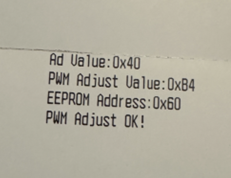
- The new more sensitive value is now permanently stored on the printer.
TIPS:
- Send bin command to verify MCT connection.
- If printer is currently in an error state (flashing 4 blinks), cycle printer power before connecting with MCT.